
Introduction
EasySpecy is a free, open-source screen recorder for Windows that delivers cinematic auto-zoom, cursor effects, keyboard overlay, and webcam compositing — the kind you'd expect from $89/year software like Screen Studio, but completely free.
Platforms: Windows (primary), macOS/Linux (experimental — basic capture only)
What is EasySpecy?
EasySpecy exists because screen recording shouldn't cost a subscription. It shouldn't be locked to one OS. And it shouldn't require a PhD in OBS settings to get polished results.
Built with Rust and Tauri 2, EasySpecy handles all performance-critical work (capture, encoding, effects) in native code. The React frontend is a thin GUI layer. FFmpeg is bundled for encoding and post-processing.
Why EasySpecy?
The Problem
Screen recording tools fall into two camps:
- Simple but limited — Basic capture, no post-processing, ugly output
- Powerful but expensive — Screen Studio ($89/year, macOS only), Camtasia ($179), Adobe Premiere ($20/month)
There's no free, cross-platform tool that gives you cinematic output out of the box.
The Solution
EasySpecy bridges that gap:
| Feature | EasySpecy | OBS | Screen Studio |
|---|---|---|---|
| Price | Free | Free | $89/year |
| Windows Support | Full | Full | Not available |
| Auto-zoom | ✅ | ❌ | ✅ |
| Cursor effects | ✅ | ❌ | ✅ |
| Keyboard overlay | ✅ | ❌ | ❌ |
| Webcam overlay | ✅ | ✅ | ✅ |
| Bundle size | ~3MB | ~200MB | ~150MB |
| Learning curve | Low | High | Low |
| Open source | ✅ (MIT) | ✅ (GPL) | ❌ |
Core Features
Cinematic Auto-Zoom
Automatically zooms toward your click positions during post-processing. Uses click detection heuristics to identify intentional clicks vs accidental movements, then smoothly animates zoom toward that position.
Status: In active development
Cursor Effects & Trails
Beautiful cursor trails rendered with:
- Catmull-Rom spline smoothing for silky-smooth paths
- Comet model — bright head at cursor position, fading tail behind
- Parallel rendering via
rayonfor maximum performance - 5 cursor packs — System, macOS, Posy, Specy Classic, Specy's Glasses
- Click effects — Ripple, spark, and impact animations
Status: Complete
Keyboard Overlay
Global keyboard capture showing pressed keys in real-time:
- WH_KEYBOARD_LL hook for system-wide key detection
- SPSC lock-free ring buffer (1024 entries, zero allocations)
- 4 themes — Speccy's Classic, Light Glassmorphism, Neon Green, Neon Purple
- Game capture support — Admin elevation for anti-cheat games
- Bubble system — Active vs sealed key displays
- Unicode key mappings — ⌃ ⌥ ⇧ ⊞ ↵ ⌫ ␣ ⎋
Status: Complete
Webcam Overlay
Picture-in-picture webcam recording:
- Sync-manager pattern — syncs to video/audio via CAPTURE_ARMED
- Resizable and repositionable — 4 corners + custom positioning
- Real-time enhancements — Sharpen, Brightness, Contrast controls
- Circle/rectangle shapes with customizable borders
- Composited into final video via FFmpeg (not live overlay)
- Uses
nokhwafor cross-platform webcam capture
Status: Complete
Dual Audio Recording
Record microphone + system audio simultaneously:
- WASAPI shared mode (Windows) — doesn't lock mic exclusively
- Configurable noise gate + spectral subtraction
- RNN noise reduction via
nnnoiselesscrate - Mic gain, system volume, noise reduction all user-adjustable
- Real-time level metering in UI
Status: Complete
Native Performance
- Rust backend — memory-safe, zero-cost abstractions
- Tauri 2 — ~3MB bundle (vs 100MB+ for Electron)
- Sub-50ms capture latency on Windows
- Parallel post-processing — rayon-based frame rendering
- Batch processing — 2x CPU cores for frame rendering
Privacy-First
- Fully offline — no internet connection required
- No telemetry — we don't collect anything
- No accounts — no sign-up, no login
- Local storage — recordings saved to your configured output directory
Region Selection
- Full screen — capture entire monitor
- Window capture — select specific application window
- Region capture — drag to select custom area
- Live preview — see selection in real-time
Architecture
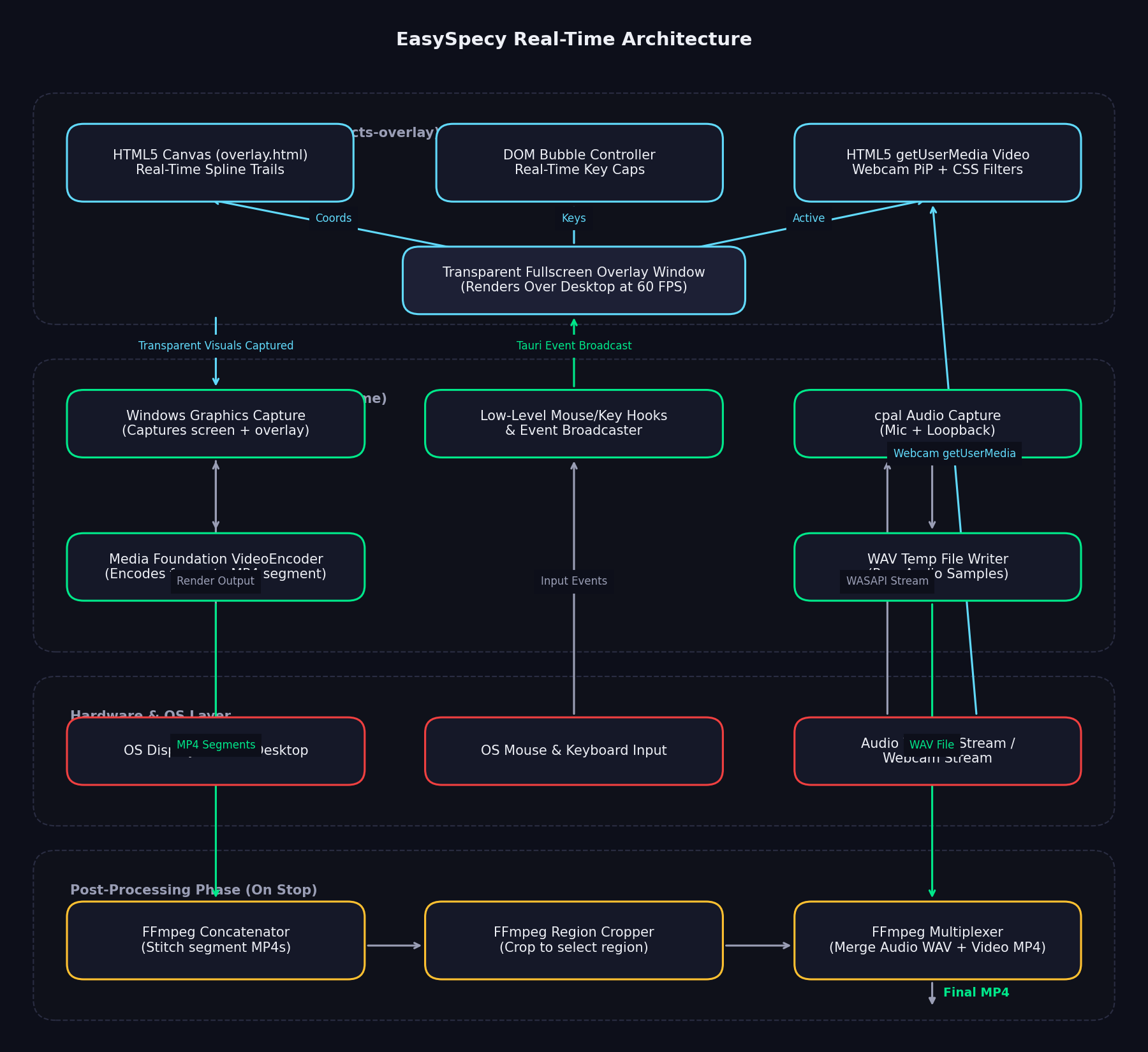
EasySpecy is designed around a real-time capture and live overlay architecture. Rather than capturing raw desktop frames and applying visual elements (like cursor trails, click effects, keyboard bubbles, and webcam overlays) during a slow post-processing phase, EasySpecy composites all visual effects live at 60 FPS in a hardware-accelerated transparent overlay window (effects-overlay loading overlay.html). The screen recorder captures the combined output in real-time, reducing post-processing overhead to almost zero.
Subsystem Flowchart
Module Breakdown
Tauri Overlay Layer (HTML5/Canvas/CSS):
- Renders high-performance Catmull-Rom spline cursor trails, click wave ripples, and neon glowing borders via an event-driven HTML5
<canvas>insideoverlay.html. - Displays real-time key cap overlays and bubble queues via optimized DOM rendering.
- Captures and displays webcam feeds using browser-level HTML5 MediaDevices (
getUserMedia), applying rounded/circular CSS cropping and filters (brightness, contrast, saturation) with zero CPU overhead.
Tauri Backend (Rust Core):
capture/— WGC (Windows Graphics Capture) setup, frame capture callback, and real-time H.264/H.265 encoding to MP4 segments via native Media Foundation APIs.audio/— Asynchronous WASAPI capture for mic + system loopback audio, real-time noise reduction via thennnoiselessRNN noise gate, and WAV temp file writing.cursors/— Win32 API cursor hook replacing system pointer graphics with custom.curpacks during recording.keyboard/— Low-level keyboard hook callback (WH_KEYBOARD_LL) feeding keys to a lock-free Single Producer Single Consumer (SPSC) queue.postprocess/— Handles final file merge (multiplexing WAV audio with MP4 video), region cropping, and segment stitching via FFmpeg commands when recording is stopped.config/— Configuration management and field updates mapped toconfig.toml.
Communication & Events:
- Tauri IPC bridge routes settings updates and handles start/stop commands.
- High-frequency Tauri event broadcaster transmits mouse coordinates (at ~60Hz) and key events from background Rust threads directly to the overlay Webview for zero-latency drawing.
Current Status
Phase 3 — Final Polish
Completed Features:
- [x] Screen/region/window capture (Windows Graphics Capture API)
- [x] Audio recording (mic + system with noise reduction)
- [x] Cursor effects (trails, smoothing, 5 packs, click effects)
- [x] Keyboard overlay (global hook, 4 themes, game capture)
- [x] Webcam overlay (sync-manager, positioning, enhancements)
- [x] System tray integration
- [x] Hotkey configuration
- [x] Recording history
- [x] Region selection with live preview
In Development:
- [ ] Auto-zoom (click detection heuristics, FFmpeg zoompan filters)
Planned:
- [ ] Live streaming support (RTMP/YouTube/Twitch)
Who is EasySpecy For?
Target Audience
- Developers recording tutorials, demos, or bug reports
- Creators making YouTube videos, course content, or social media
- Educators recording lectures or presentations
- Anyone who wants polished recordings without paying subscriptions
Non-Target Use Cases
- Live streaming — EasySpecy records to file, not streams
- Enterprise deployment — No centralized management (yet)
- Cloud collaboration — Fully offline, no sharing features
Next Steps
- Installation — Get EasySpecy running on your system
- Quick Start — Record your first video in 5 minutes
- Core Features — Learn about capture modes, audio, and effects
Community
- GitHub: IsNoobgrammer/EasySpecy
- Issues: Report bugs or request features
- License: MIT
Ready to start? → Installation Guide